RapidSetupX: IO Page.
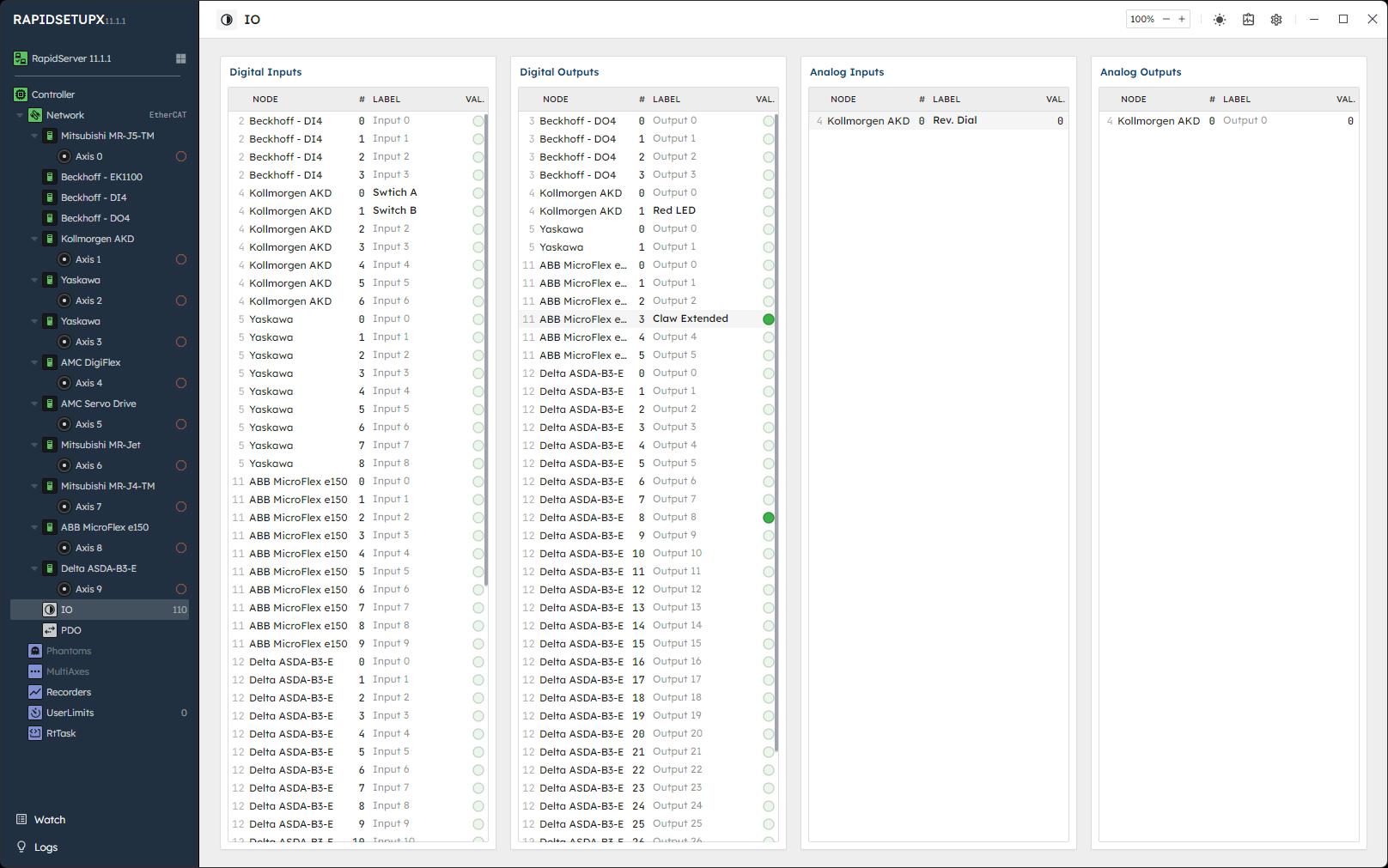
- Visualize all I/O in available to the controller.
- Modify digital & analog outputs.
- Name each I/O point with a label that is stored on the controller.
- Export the node and I/O labels to a CSV file.
- Visit our IO concept page for more
🔹 Labels
Each row's LABEL column is an editable field. These labels live on the controller, and so are shared across multiple RapidSetupX instances or rapidserver reconnects.
- A point with no label shows its default name, such as Input 3.
- To remove a label, right-click it and choose Clear label, or clear the field and commit.
- Hover over a labeled point to see its current label and default name.
- The field is disabled until the node has finished network configuration.
- A label outlined in red indicates that the previous set attempt failed. Check the Logs panel for information as to why.
- Note
- A network discovery clears node and IO labels, even if the topology has not changed. Axis labels are not affected. RapidSetupX warns and offers to export the labels first; see the Network page.
See DigitalInUserLabelSet, DigitalOutUserLabelSet, AnalogInUserLabelSet, and AnalogOutUserLabelSet for the RapidCode calls behind these fields.
Export
The save icon to the right of the IO lists saves every node label and IO label to a CSV file. The file has one row per label, with these columns: NodeIndex, VendorId, ProductCode, StationAlias, NodeName, Kind, Index, and Label. Index corresponds to the IO index and is blank for a node label.
- The export holds the labels RapidSetupX is currently showing. Labels written by another application since RapidSetupX last refreshed them may be missing.
- The Logs panel names each node from which labels were not read.
- RapidSetupX does not import label files.

 1.15.0