
|
APIs, concepts, guides, and more
|
|
|
APIs, concepts, guides, and more
|
A command-line utility that enables access to the RMP from any operating system via Remote Procedure Call (RPC) using gRPC. It serves as a backend service for RapidCodeRemote, allowing remote interaction with the RMP Motion Controller.
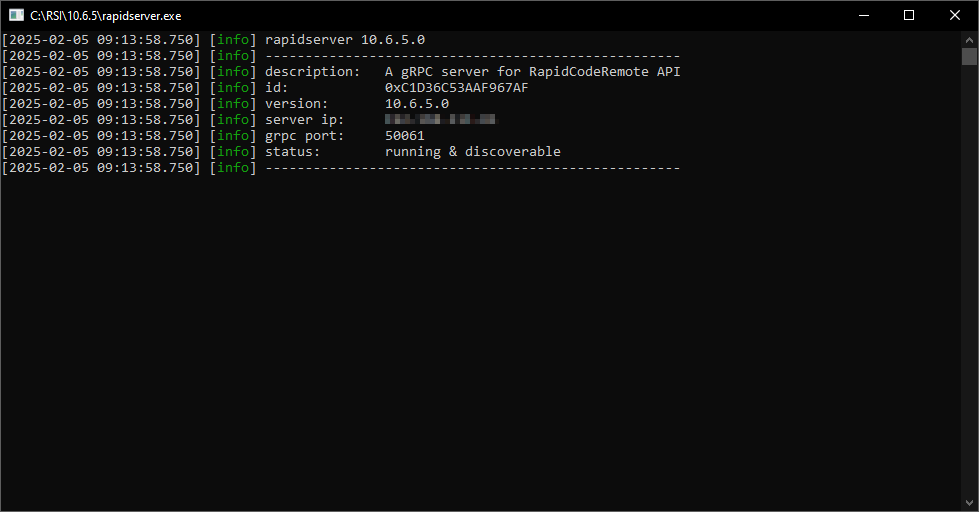
| OS | Executable |
|---|---|
| Windows | rapidserver.exe |
| Linux | rapidserver |
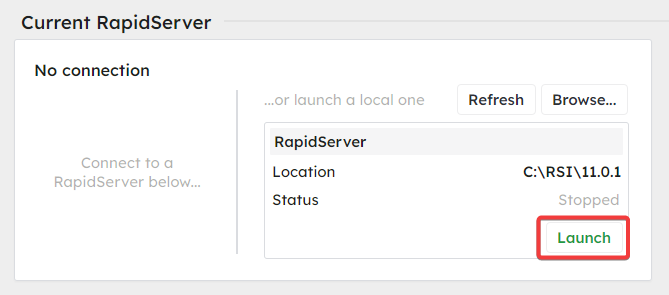
Note: Launch feature only available in RapidSetupX 11.0.1 and above
To start a local RapidServer that will be managed by RapidSetupX, use the following procedure:
To start an independent local RapidServer, use the following procedure:

When you install the RMP Debian package, the rapidserver systemd service is automatically enabled and started. You can manage it using standard systemctl commands:
| Command | Description |
|---|---|
| sudo systemctl status rapidserver | Check if rapidserver is running |
| sudo systemctl start rapidserver | Start the service |
| sudo systemctl stop rapidserver | Stop the service |
| sudo systemctl restart rapidserver | Restart the service |
| sudo systemctl enable rapidserver | Enable auto-start on boot |
| sudo systemctl disable rapidserver | Disable auto-start on boot |
The service runs from /rsi/rapidserver and uses /rsi as its working directory.
To view the service logs:
rapidserver can be installed as a Windows service so it starts automatically with the system.
| Command | Description |
|---|---|
| rapidserver --install | Install as a Windows service then exit. |
| sc start RapidServer-50061 | Start the service. |
| sc stop RapidServer-50061 | Stop the service. |
| rapidserver --uninstall | Uninstall the Windows service then exit. |
The default service name is RapidServer-50061. Logs are written to the Windows Event Log under the source RapidServer-50061.
All install and uninstall commands require an elevated (Administrator) prompt.
On a system running more than one RMP controller, run one rapidserver per controller, each on its own port, and bind each instance to its controller. The binding identity is the INtime node name on Windows and the controller index on Linux:
A bound server attaches to its own controller's firmware, a client create that omits the controller identity lands on the bound controller, and a client create naming a different controller is rejected with an error that points to the correct server. The startup banner shows the binding (intime node: on Windows, controller: on Linux). On Windows, --install persists the node binding in the installed service.
A server started without a binding keeps the single-controller behavior: it attaches the default controller, and a client create may place the controller anywhere.
When a tool like RapidSetupX allows you to connect to multiple rapidservers:
In addition to TCP, rapidserver listens on a local IPC (Inter-Process Communication) endpoint. IPC bypasses the network stack entirely, providing lower latency when a client like RapidSetupX runs on the same machine as rapidserver.
| Platform | IPC Endpoint |
|---|---|
| Windows | Named pipe at \\.\pipe\rapidserver-50061 |
| Linux | Unix domain socket at /tmp/rapidserver-50061.sock |
The ipc: line in the startup banner shows the active path. Clients that support IPC can connect to this endpoint instead of http://localhost:50061 for lower latency.
To interact with a rapidserver instance, users need the following:
Once the .proto files are available, users can compile them using the Protocol Buffer compiler (protoc) to generate client code in their preferred programming language. This generated code enables:
By establishing a gRPC connection, users can seamlessly interact with RapidCodeRemote and other services exposed by rapidserver.
| Argument | Description |
|---|---|
| -address | IP address the server binds to. |
| -grpc_port | TCP port number for gRPC calls. |
| -name | Friendly name for the server. |
| -echo | Echo request messages in the response header. |
| --log-level | Log level: trace, debug, info, warn, error, critical, off. |
| --version | Show version information. |
| -h, --help | Show help and usage information. |
Windows-only arguments:
| Argument | Description |
|---|---|
| --service | Run as a Windows service under SCM. |
| --install | Install as a Windows service then exit. |
| --uninstall | Uninstall the Windows service then exit. |
| -node_name | Bind this server to an INtime node (e.g., NodeB). See Multiple Controllers. |
Linux-only arguments:
| Argument | Description |
|---|---|
| -controller_index | Bind this server to a controller index (0, 1, ...). See Multiple Controllers. |
 1.15.0